SaaS alternatives guide · Prices checked October 7, 2026
Kit Alternatives for SaaS Teams: Prices and Fit
Stay on Kit while your email is a newsletter; move when trial, workspace or billing state has to decide the message. Customer.io fits event-heavy journeys, Userlist and Encharge fit SaaS-shaped data, Loops is the lightest step, and MailerLite is the cheaper newsletter swap. Kit’s own Creator plan lists $116 a month at 10,000 subscribers, so most of these cost more, and the extra buys product context.
Kit, the product formerly called ConvertKit, is built for creators: forms, landing pages, broadcasts, tagged audiences and sequences. SaaS teams usually leave when the thing they need to message is not a subscriber with tags but a person inside a workspace on a plan. This guide runs through 15 alternatives, each with the prices its own page showed on October 7, 2026, and says what you give up by leaving Kit’s simple model.
Compare at your own list size rather than the entry price: Kit’s Creator plan runs from $33 a month at 1,000 subscribers to $166 at 25,000, and several rivals use a different meter, such as profiles, users or emails sent.
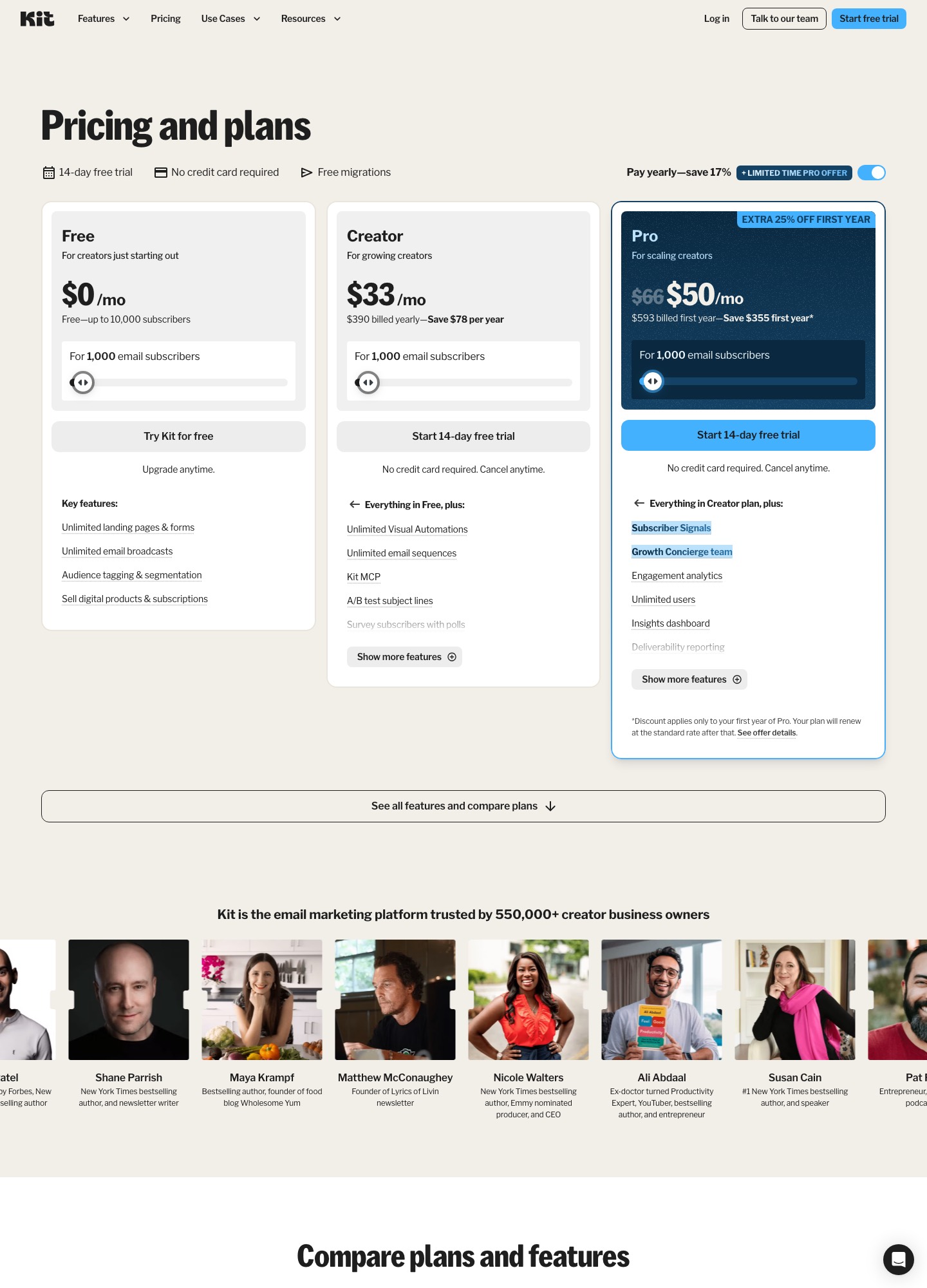
What you are leaving: Kit in numbers
Kit’s pricing page lists a free plan for up to 10,000 subscribers with unlimited landing pages, forms and email broadcasts, tagging and segmentation, and the ability to sell digital products and subscriptions. Visual Automations and email sequences start on Creator, which shows $33 a month for 1,000 subscribers ($390 billed yearly), $75 at 5,000, $116 at 10,000 and $166 at 25,000, as yearly-billed monthly rates. Pro adds Subscriber Signals, unlimited users, deliverability reporting and a newsletter referral system, at $158 a month for 10,000 subscribers and $233 for 25,000. Paid plans come with a 14-day free trial with no credit card, and Kit advertises free migrations into the product.
Three things push SaaS teams out. Product state has no home in a tag list, so “invited a teammate” or “hit the seat limit” gets faked with manual segments that go stale. Account identity is missing, which means one person’s action cannot route a whole workspace. And the free plan’s generosity hides the cost curve: crossing from the free tier to automations is where the bill starts. If none of these applies, you probably should not move.
15 alternatives at a glance, with list prices
| Tool | Best for | List price read on 7 Oct 2026 | Main trade-off |
|---|---|---|---|
| Customer.io | Event-driven product journeys | Essentials $100/mo for 5k profiles, billed monthly; Premium from $1,000/mo billed yearly | Needs a named owner for the event schema and identity rules. |
| Loops | Lean product email for early-stage SaaS | Free up to 4,000 sends per rolling 30 days; $99/mo at 9,998 subscribers; $249 at 49,989 | It is an email product, so CRM ownership and publishing features live elsewhere. |
| MailerLite | Newsletters plus simple automation at a lower price | Comfort $49/mo at 5,000, $89 at 10,000, $179 at 25,000 subscribers (monthly billing); free up to 250 subscribers | Little help once triggers depend on account or billing state. |
| Brevo | Budget-conscious campaigns plus transactional mail | Free 300 sends/day, up to 100,000 contacts; Starter from $9/mo; Standard from $18/mo | Marketing and operational mail still have to be split by sender and consent. |
| ActiveCampaign | CRM-connected nurture for small teams | Starter $15/mo, Plus $49, Pro $79, Enterprise $145 at 1,000 contacts, billed annually | Entry tiers list one user, and branching needs ongoing maintenance. |
| HubSpot | CRM-led lifecycle and sales alignment | Free tools with 2,000 sends/mo; Professional $800/mo; Enterprise $3,600/mo | The tier with unlimited automation is a large step up from Kit Creator. |
| Mailchimp | Familiar campaigns and a broad integration list | Standard from $20/mo at 500 contacts; $100/mo at 2,501-5,000 and $135 at 5,001-10,000 after first-year promotions | Costs more than Kit Creator at the same list size and adds no product-event model. |
| Userlist | Messaging by user and by company | Basic $149/mo up to 10,000 users, +$10 per extra 1,000; Professional $349/mo | Not a publishing tool, so the newsletter side may stay elsewhere. |
| Resend | Developer-owned application email | Free 3,000 emails/mo (100/day); Pro $20/mo for 50,000 emails; Scale $90/mo for 100,000 | Audience, preference centre and nurture logic are yours to build. |
| Postmark | Reliable transactional and operational messages | Free 100 emails/mo; Basic $15/mo for 10,000 emails | Not a newsletter or nurture platform. |
| Klaviyo | Commerce-led or hybrid subscription businesses | Billed by profile count; the estimate is on its pricing page | Commerce-first assumptions may not suit a pure B2B product. |
| Braze | Enterprise lifecycle orchestration | Sales-led; its pricing page lists no self-serve plan | Heavy implementation and governance work. |
| Iterable | Cross-channel experimentation | Demo-led; no list price on its pricing page | Breadth beyond what a small team will operate. |
| SendGrid | API-connected delivery infrastructure | Marketing Campaigns free up to 2,000 contacts and 6,000 emails/mo; Email API Essentials from $19.95/mo | Preference centre, segmentation and lifecycle logic need extra application work. |
| Encharge | Behaviour flows driven by billing and product events | Growth $99/mo at 2,000, $179 at 5,000, $249 at 10,000 subscribers (monthly billing) | Not a newsletter tool, and the CRM connectors sit on Premium. |
The meters differ: Kit, MailerLite and Encharge count subscribers, Loops counts subscribed contacts, Userlist counts every user, Customer.io counts people and objects as profiles, ActiveCampaign and Mailchimp count contacts, and Brevo, Resend, Postmark and SendGrid price by email volume. Kit’s figures are monthly rates on yearly billing, while MailerLite’s and Encharge’s are monthly billing.
Which one to pick
- Product events should trigger email: Customer.io for breadth, Encharge if a marketer owns the flows, Loops if a handful of messages is enough.
- Your customers are teams: Userlist, which keeps company records and segments next to users.
- Leads need a sales owner: ActiveCampaign for a light CRM, HubSpot if sales and support share the record.
- You still publish a newsletter and want to pay less: MailerLite, or stay on Kit’s free plan.
- The pain is app mail: Postmark, Resend or SendGrid beside whatever handles the audience.
The alternatives, one by one
Customer.io: when the next message depends on what happened in the app
Customer.io is the strongest fit once a Kit tag no longer says where someone is: invited a teammate, connected an integration, hit a usage limit. Essentials lists the visual workflow builder and 1 million emails a month for $100 a month at 5k profiles, billed monthly, and it counts people and objects together as profiles. That is a long way from Kit’s free plan at 10,000 subscribers, so it only pays off when product events decide the message. Companies that raised under $10M can apply for twelve months free through its Startup Program.
Trade-off: Needs a named owner for the event schema and identity rules. Pilot: Define person, account and subscription records, send three real events for a test workspace, and confirm that upgrading ends the trial sequence. Prices from Customer.io’s own page.
Loops: the lightest step from creator tooling to product email
Loops suits a startup that wants product-aware email without a marketing suite. It prices by subscribed contacts, so the subscriber count you carry over from Kit matters: its slider read $99 at 9,998 subscribers and $249 at 49,989. The free plan allows unlimited contacts but only 4,000 sends in any rolling 30 days to the 1,000 newest contacts, and every feature is on every plan with no seat fee. Transactional email is included on paid plans at no extra charge, which removes one reason Kit users add a second tool. See Loops alternatives for the next step up.
Trade-off: It is an email product, so CRM ownership and publishing features live elsewhere. Pilot: Rebuild the welcome sequence, add one event-triggered onboarding message, and check that the exit fires when the account upgrades. Prices from Loops’s own page.
MailerLite: if the newsletter is still the product
MailerLite is the nearest like-for-like move when Kit mostly carries a newsletter, lead magnets and a nurture sequence and cost is the reason you are looking. On monthly billing its Comfort plan lists $49 at 5,000 subscribers, $89 at 10,000 and $179 at 25,000, against Kit Creator at $75, $116 and $166 at the same sizes. Kit’s are yearly-billed monthly rates, so the comparison is rough, but it shows MailerLite cheaper at 5,000 and 10,000 and dearer at 25,000. Its free plan holds 250 subscribers and 2,500 emails a month, far below Kit’s 10,000.
Trade-off: Little help once triggers depend on account or billing state. Pilot: Move one consented list, its tags as groups, and the welcome sequence; test unsubscribes and a re-import. Prices from MailerLite’s own page.
Brevo: one vendor for the newsletter and the receipts
Brevo is worth a look if your Kit account has quietly become your only sender and you want transactional email next to campaigns. Its free plan stores up to 100,000 contacts but sends 300 emails a day, which suits a small list far better than a launch to 10,000 people at once. Starter starts at $9 a month and Standard, which adds automation, A/B testing and advanced reports, at $18, both from 5,000 emails a month; the email volume you pick sets the tier.
Trade-off: Marketing and operational mail still have to be split by sender and consent. Pilot: Send a newsletter and a password reset from a test domain and check that unsubscribes apply only to the newsletter. Prices from Brevo’s own page.
ActiveCampaign: when a newsletter subscriber turns into a sales lead
ActiveCampaign is the step toward a CRM: Kit’s tags become contacts with deals, owners and scoring. Its pricing page lists Starter at $15 a month, Plus at $49, Pro at $79 and Enterprise at $145 for 1,000 contacts, billed annually, with Starter and Plus limited to one user and Starter to 5 actions per automation. A creator who sells courses and takes the occasional sales call may find Starter enough; a team that wants shared access should look at Pro, which lists three users. The other direction is covered in ActiveCampaign alternatives.
Trade-off: Entry tiers list one user, and branching needs ongoing maintenance. Pilot: Map one high-intent action to an owner and a pipeline stage and confirm the follow-up stops when a deal is won. Prices from ActiveCampaign’s own page.
HubSpot: when sales, support and marketing share one record
HubSpot’s free Marketing Hub tools include 2,000 marketing email sends a month with HubSpot branding, which covers a small newsletter, but only one automated action. Starter allows up to 10 automated actions, and Professional, at $800 a month on its marketing pricing page, lists unlimited automation. Set that against Kit Creator at $116 for 10,000 subscribers before deciding a CRM is the missing piece rather than a nice extra. The CRM-first view is in ActiveCampaign vs HubSpot.
Trade-off: The tier with unlimited automation is a large step up from Kit Creator. Pilot: Price the minimum hubs and seats for one journey, then run a test contact from newsletter signup to a sales task. Prices from HubSpot’s own page.
Mailchimp: familiar campaigns, but contact bands add up
Mailchimp is the safe-looking move, with a mature editor, templates and a wide integration list, and it rarely saves money. Its Standard plan lists $20 a month at the default 500-contact selector, $50 a month for the first 12 months at 2,501 to 5,000 contacts and then $100, and $135 at 5,001 to 10,000 after the promotion, against Kit Creator at $75 for 5,000 and $116 for 10,000. It does give a Kit user ready-made integrations. The head-to-head is in ConvertKit vs Mailchimp.
Trade-off: Costs more than Kit Creator at the same list size and adds no product-event model. Pilot: Run one activation event through the integration you plan to use, then confirm consent and suppression carry over. Prices from Mailchimp’s own page.
Userlist: a user and company record instead of a tag list
Userlist replaces the subscriber-with-tags model with separate user and company records and segments for each, so you can message everyone in a workspace that has not yet invited a teammate. Basic costs $149 a month for up to 10,000 users and $10 for each extra 1,000; its page shows $229 at 18,000 users and $369 at 32,000. Professional at $349 adds A/B split testing and conversion goals. If your audience is mostly readers rather than app users, that price buys features you will not use.
Trade-off: Not a publishing tool, so the newsletter side may stay elsewhere. Pilot: Import one workspace with two members, change a plan, and confirm the sales handoff fires once. Prices from Userlist’s own page.
Resend: when engineering wants to send app mail from code
Resend replaces nothing Kit does for an audience, and that is the point: use it for invites, receipts and notifications while a marketing tool handles the audience. Its free plan lists 3,000 emails a month with a 100-a-day limit; Pro is $20 a month for 50,000 emails and Scale $90 for 100,000, with extra emails at $0.90 per 1,000. See Resend alternatives for its own trade-offs.
Trade-off: Audience, preference centre and nurture logic are yours to build. Pilot: Send a welcome and an invite from a staging domain, then trigger a retry and a missing-variable case. Prices from Resend’s own page.
Postmark: for the messages users must receive
Postmark is a delivery-first sender. Basic is $15 a month for 10,000 emails with extra emails at $1.80 per 1,000, and the free plan is limited to 100 emails a month. Pair it with whatever replaces Kit if verification, invite and billing notices have been riding on a newsletter tool.
Trade-off: Not a newsletter or nurture platform. Pilot: Move one access-critical message and test bounce handling, suppression and the logs you would use in an incident. Prices from Postmark’s own page.
Klaviyo: for a SaaS that also runs a storefront
Klaviyo becomes relevant when purchases, subscriptions or catalogue items matter as much as product activity, for instance a SaaS with a template shop or a paid add-on store. Its strength is segmentation on customer and order data. For a pure product-led app, the commerce concepts add cost and vocabulary you will not use.
Trade-off: Commerce-first assumptions may not suit a pure B2B product. Pilot: Send an order event and a usage event for a test profile and check that segments, messages and reporting agree. Prices from Klaviyo’s own page.
Braze: lifecycle across channels at enterprise scale
Braze belongs on this list only for a larger organisation with dedicated data and engineering owners. Its pricing page offers a free-trial route and a sales conversation rather than prices, so a Kit-sized budget will not map onto it. The value is one shared customer journey across channels, not a newsletter migration.
Trade-off: Heavy implementation and governance work. Pilot: Start with one measurable journey and a written data contract covering identity, retention and exports. Prices from Braze’s own page.
Iterable: cross-channel experimentation for a larger team
Iterable’s pricing page directs buyers to book a demo and lists no plan prices. It is a candidate when moving off Kit is also a move toward coordinated testing across owned channels. Keep the first phase to one audience and one approval path, and confirm the setup still makes sense if you only use email at first.
Trade-off: Breadth beyond what a small team will operate. Pilot: Run one audience through one approved journey, export the results, and review the cost with sales before expanding. Prices from Iterable’s own page.
SendGrid: delivery infrastructure with a marketing add-on
SendGrid’s pricing page covers two products. Email API plans start with Essentials at $19.95 a month in the plan selector, and Marketing Campaigns has a free plan up to 2,000 contacts and 6,000 emails a month plus a Basic plan from $15. It suits engineering-led teams that want direct control over delivery events; moving a Kit audience to it means rebuilding segmentation and a preference centre.
Trade-off: Preference centre, segmentation and lifecycle logic need extra application work. Pilot: Port one welcome sequence and confirm unsubscribe links and list suppression behave as before. Prices from SendGrid’s own page.
Encharge: visual flows when the audience is SaaS users
Encharge prices by subscribers and lists unlimited flows and team members on Growth, which is $99 a month at 2,000 subscribers, $179 at 5,000 and $249 at 10,000 on monthly billing. Its integrations include Stripe, Chargebee, Shopify and Zapier, so a trial-to-paid flow can run on billing events instead of tags. Premium, from $159 at 2,000 subscribers, adds HubSpot, Salesforce and transactional email. Next to Kit Creator at $116 for 10,000 subscribers, you pay more for product state. See Encharge alternatives.
Trade-off: Not a newsletter tool, and the CRM connectors sit on Premium. Pilot: Build one trial-to-paid flow around a Stripe event and confirm it exits when payment succeeds. Prices from Encharge’s own page.
Moving off Kit: what to rebuild first
Begin with the part of Kit that does not export as logic: sequences and Visual Automations. List each one with its entry trigger, delays, branches and the tags it adds or removes, then decide which still earn their place. Tags are the second job, because they usually carry meaning that was never written down, such as “bought course” or “attended webinar”. Turn each tag into a named property or segment in the new tool before you import, or the audience arrives unlabeled.
Next, decide where unsubscribes live. Export unsubscribed addresses and import them as suppressed before the first send, and if you keep Kit for the newsletter while adding a product tool, pick one system as the source of truth and mirror changes to the other. If you sell digital products or subscriptions through Kit, the audience can move but the sales pages and the payment relationship need their own plan.
Run one product-state sequence first, for example new trials who have not invited a teammate, with an explicit exit when they do. Send it to seed addresses, then to a small live group, and only then move the remaining sequences. Point sending-domain authentication at the new tool last.
Related guides
Continue with the alternatives hub, ConvertKit vs Mailchimp, comparison guides, startup use cases and the SaaS email strategy framework.
Bottom line
Name the gap before shortlisting: product events point to Customer.io or Encharge, account context to Userlist, lean product email to Loops, a shared CRM record to HubSpot, and app mail to Postmark or Resend. If your Kit use is still broadcasts, forms and paid newsletters, the free plan or Creator tier is hard to beat on price.
FAQ
How much does Kit cost compared with the alternatives?
Kit’s pricing page lists a free plan up to 10,000 subscribers, and its Creator plan, which adds Visual Automations and sequences, at $33 a month for 1,000 subscribers ($390 billed yearly), $75 at 5,000, $116 at 10,000 and $166 at 25,000. On list prices read on October 7, 2026, MailerLite Comfort is $49 at 5,000 subscribers and $89 at 10,000 on monthly billing, Loops is $99 at about 10,000, and Encharge Growth is $249 at 10,000. The meters differ, so price the shortlist at your own list size.
Can I keep Kit for the newsletter and add a product-email tool?
Yes, and it is often the cheapest first step. Kit’s free plan keeps broadcasts, forms and landing pages for up to 10,000 subscribers, while a tool such as Loops (free up to 4,000 sends in any rolling 30 days) or Customer.io handles trial and activation messages from product events. The cost is two audiences to keep in sync, so decide which system owns unsubscribes before you split.
How do I move Kit sequences, tags and subscribers?
Export subscribers with their tags and the forms they joined through, and keep a separate list of unsubscribed addresses so the new tool never mails them. If you sell digital products or subscriptions through Kit, moving the audience does not move the sales page or the payment relationship, so treat that as its own task. Map each tag to the new platform’s identity model before importing. Sequences and Visual Automations are rebuilt by hand, so write each one down first, rebuild one with an explicit activation exit, send it to seed contacts, and leave Kit sending everything else until the copy behaves the same.
Should password resets and receipts come from the same tool as the newsletter?
Usually not. Kit is built around broadcasts and sequences to an audience, and a spike in complaints on a newsletter can hurt mail you cannot afford to lose. A transactional sender such as Postmark ($15 a month for 10,000 emails) or Resend ($20 a month for 50,000) keeps invites and receipts on their own subdomain and suppression list.
When should a team stay on Kit instead of switching?
Stay when the business still behaves like a publication, with broadcasts, forms, simple sequences and paid newsletters, and product events are a wish rather than a blocker. Kit’s Creator plan at $116 for 10,000 subscribers is cheaper than Encharge Growth ($249) or Userlist Basic ($149) at the same size. Move when trial state, workspace membership or billing events decide what you send and tags cannot express them.